I’ve been in this situation more than once. You join a company, or step into a new scope, and realise the design system either doesn’t exist or exists in fragments. Some components are duplicated. Some are outdated. Some were built once and never touched again. Designers are doing their best to stay consistent, but everyone is solving problems slightly differently within their own libraries.
At the same time, the business is moving. Designers are shipping work. Engineers are building features. Product is pushing forward. And you’re hired to fix it. Not in six months. Not when everything slows down. Now. That’s where the reality sets in. You don’t get to stop the world to build a design system. You have to build it while everything is already in motion.
The moment things shift
At first, it feels overwhelming. You look at everything that needs to be done. Foundations, components, documentation, accessibility, alignment with engineering. It’s easy to fall into the trap of thinking you need to define everything upfront.
But that’s not how this works. The shift happens when you stop treating the design system as a standalone project and start treating it as infrastructure that evolves alongside the product. You’re not building something in isolation. You’re stabilising a system that is already in use.
Listening becomes your roadmap
The most valuable signal doesn’t come from audits or frameworks. It comes from your team. You start paying attention to what designers or teams say during critiques, project reviews, and casual conversations.
- Someone asks which button to use.
- Someone recreates a component because they couldn’t find it.
- Someone builds a new pattern because nothing existing fits their need.
Those moments matter. Instead of treating them as one-off questions, you treat them as patterns. You listen closely, not just to the question itself, but to what it reveals about the gaps in your system. Over time, those signals start to form a clear direction. Not based on assumptions, but based on real usage.
Balancing reactive and proactive work
It’s easy to become reactive in this phase. Designers need help. Projects are moving. Questions keep coming in. If you only respond to what’s in front of you, the system becomes fragmented. You solve problems one by one, but you never step back to connect them.
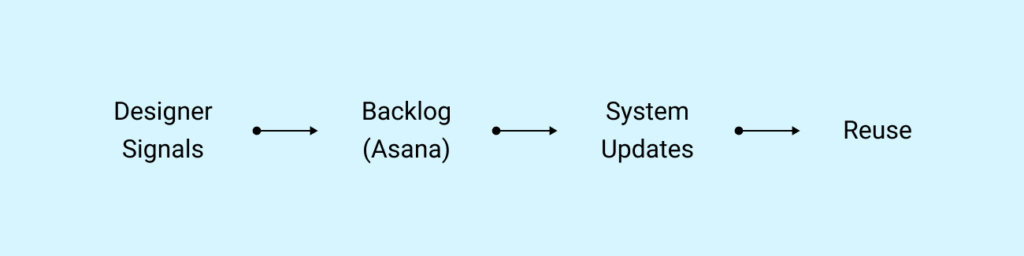
This is where structure comes in. For me, that structure lives in a task board. I personally use Asana to track every component, pattern, or guideline that needs to exist. I’ve even set up a web form for peers to submit component request. Every question, every gap, every repeated workaround gets captured. That gives you visibility.
You’re no longer guessing what to build next. You’re prioritising based on:
- What’s blocking designers
- What’s being recreated
- What’s inconsistent across the product
At the same time, you look ahead. If you notice three teams building slightly different versions of a form, you don’t wait for a fourth. You step in and define the pattern before it spreads further. That’s the balance. You respond to real needs, but you also prevent future problems.
You don’t build it alone
Even if you’re responsible for the system, you don’t build it by yourself. You design it with the team. That might be a group of in-house designers. It might include external agency partners. It might be a mix of both. It doesn’t matter.
What matters is that the system reflects how people actually work. When a designer creates something new, you don’t immediately absorb it into the system. You ask questions.
- Why did you need this?
- What problem were you solving?
- Does this apply beyond this one page?
- How would this scale if we used it in five other places?
Those conversations shape the system. You’re not collecting components. You’re extracting intent and turning it into something reusable.
Structuring the system in Figma
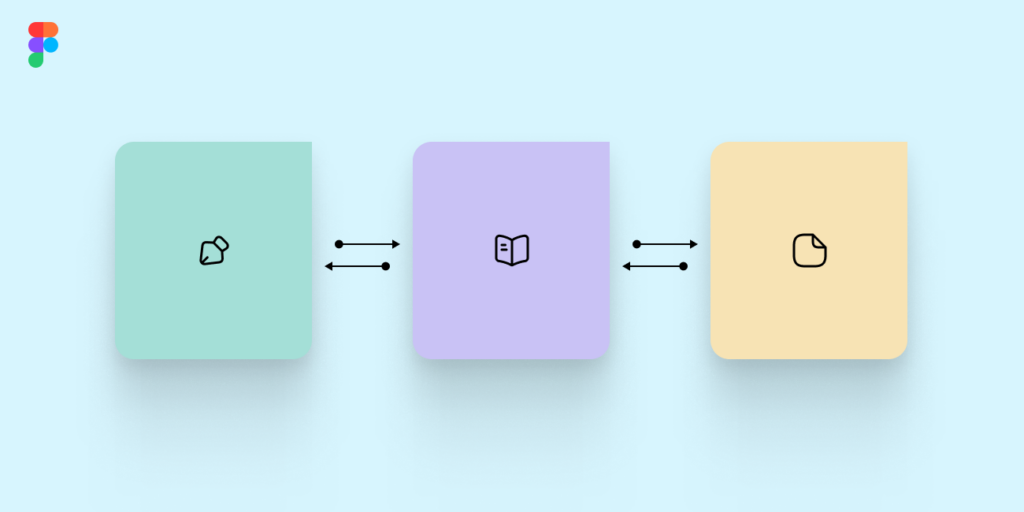
As the system starts to take shape, structure becomes critical. The way I approach this is by separating the system into three core libraries.
The first is the brand foundation. This includes typography, colour tokens, spacing, iconography, and visual primitives. These are the elements that define the brand across every platform. They don’t change often, and when they do, it’s intentional.
The second is the component library for web and shared experiences. This is where buttons, forms, inputs, navigation patterns, and reusable UI elements live. This is the layer most designers interact with daily.
The third is the platform-specific library, usually for iOS and Android. These components respect native behaviours and constraints. They can’t always match the web, and that’s fine. They serve a different purpose.
Keeping these separate reduces confusion. Designers know where to go. Engineers know what maps to what. The system becomes easier to navigate and maintain.
Building with engineering changes everything
The moment you bring engineering into the process early, everything improves. When engineers are involved while components are being defined, they start to understand the intent behind the work. They ask better questions. They flag edge cases earlier. They help shape behaviour, not just implementation.
But this only works if they know how to collaborate inside the design environment.
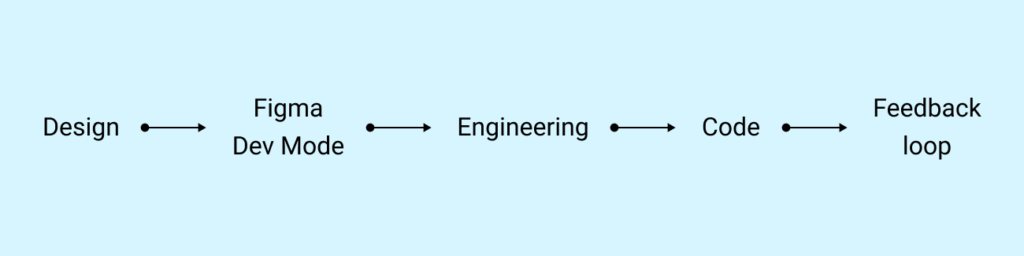
When I first stepped into this, I realised something quickly. The problem wasn’t just the absence of a system. It was that engineers hadn’t been properly onboarded into how to use Figma as part of their workflow. Figma Dev Mode existed, but it wasn’t being used effectively. Handoffs were still happening in fragmented ways. Measurements were being interpreted differently. Tokens weren’t always clear. Designers and engineers were technically using the same tool, but not speaking the same language.
So I treated onboarding engineers as part of building the system.
I created and led training sessions focused on:
- How to use Figma Dev Mode properly
- How to inspect components, states, and variants
- How to understand spacing, tokens, and behaviour directly from the source
- How to collaborate with designers inside the file instead of outside of it
More importantly, I didn’t treat it as a one-time session. I worked alongside them. I answered questions in real time. I adjusted documentation based on where confusion showed up. Over time, something shifted. Engineers stopped seeing Figma as a static handoff tool. They started using it as a source of truth. They became more confident navigating components. They relied less on assumptions and more on what was defined.
And as the component library grew, the system became easier to implement correctly, because the foundation was shared. When you build the system with engineering, and you invest in how they engage with it, the quality of what gets shipped improves significantly. You move away from interpretation. You move toward alignment.
Defining how things get added
As the system grows, contribution needs to be intentional. Not every new design should automatically become a component. Not every variation deserves a place in the library.
This is where your role becomes more focused.
You define:
- What qualifies as a reusable component
- How it should behave across different contexts
- What states and edge cases need to be included
- How it should be documented
You also make it clear how designers can contribute. They don’t need to wait for you to create everything. But they do need to align with the system. This keeps the system from becoming noisy.
Letting the work guide the system
Over time, you realise something important. The product is not slowing down. And that’s fine. The ongoing work is what shapes the system. Every feature, every flow, every constraint adds another layer of understanding. Your role is to capture that learning, structure it, and make it reusable.
You’re not chasing perfection. You’re building consistency over time. And at some point, it stops feeling like you’re building a design system.
You’re building alignment between designers and engineers.
You’re building clarity in how decisions are made.
You’re building speed because people don’t have to start from scratch.
You’re building trust in the product because it behaves consistently.
The components are just one part of that.
There’s no clean starting point for this kind of work. It’s always a bit messy in the beginning. But if you stay close to the team, listen carefully, and build with intention, the system starts to take shape. Not as a separate artifact, but as something that lives inside the way your team works. If you’re currently navigating this or thinking about how to structure your own system, feel free to reach out. I’m always open to exchanging ideas.
You can connect with me on LinkedIn or through the contact form on my site